Commands
Jobs can be named by queue number, pid, or name.
Watching the queue
| Command | What it does |
|---|---|
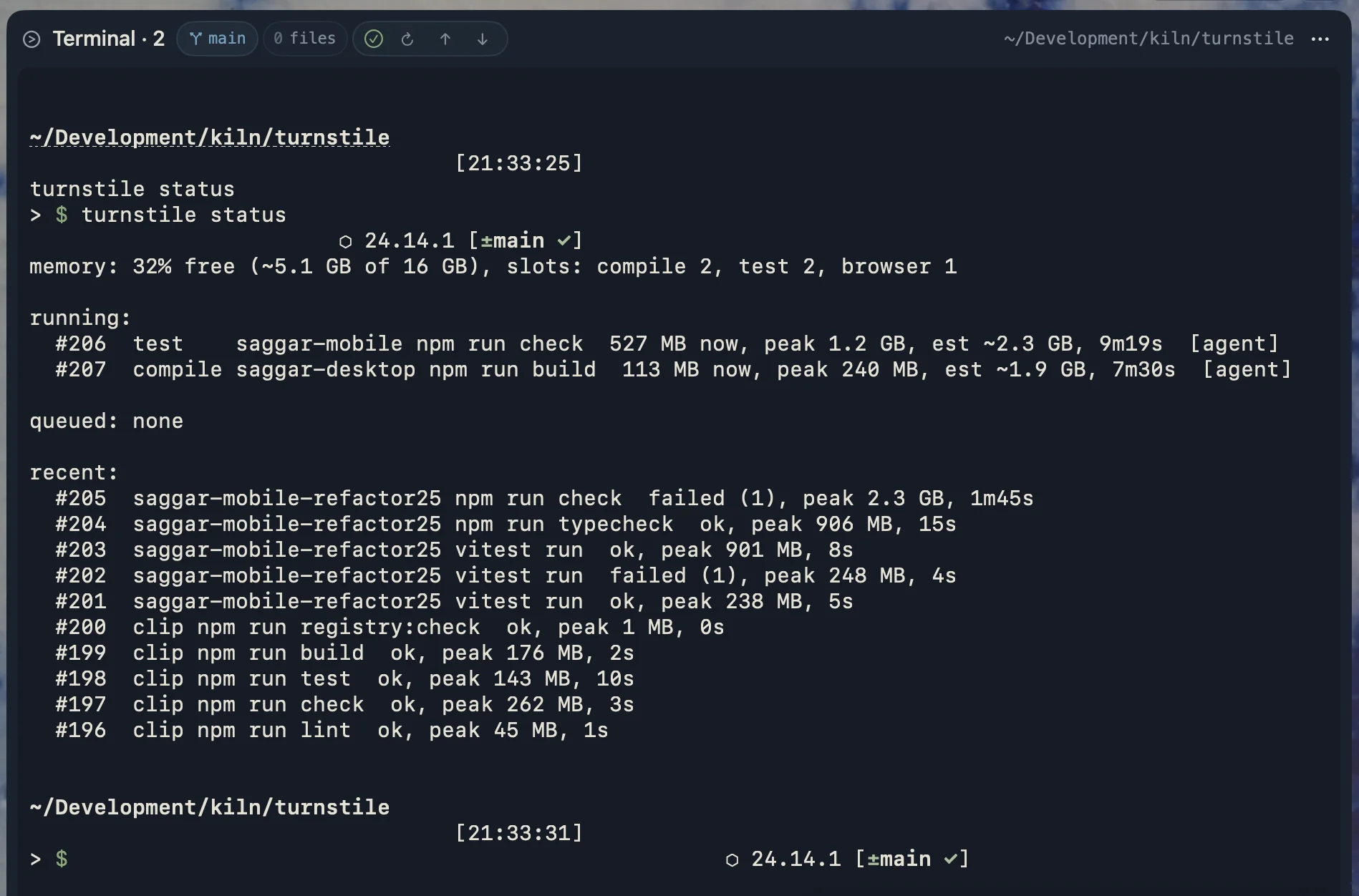
turnstile status [--json] [--watch] | Running and queued jobs, memory, and recent runs. --watch redraws every second |
turnstile top | Interactive view of the queue. Select a job with ↑↓ or j/k, then b bump, p pause/resume, h hold/release, x kill, q quit |
turnstile logs <job> [-f] | Output captured from a run with no terminal, such as an agent's, by job number. -f follows it until the run ends |
turnstile history [--days 30] [--here] [--limit 20] [--json] | What each command costs and how long jobs waited. --here narrows it to this project |
turnstile apps [--days 7] [--limit 10] [--json] | Which apps usually hold memory outside turnstile's jobs, so you can see what your builds are queuing behind |
When the daemon answers, status --json keeps the status snapshot fields (daemonPid, memoryLevel, running, and queued). New daemons also include memoryObservation, with source, sample time, optional observed values, effective pressure, and per-read errors. Older daemons omit that field. Required numeric fields remain compatible with older consumers and can contain scheduling fallbacks; use memoryObservation to establish whether values were observed.
When status cannot be observed, JSON includes observation (absent, permissionDenied, unreachable, or unknown), socket, error, and action. daemon: false means no listener was found at that endpoint; daemon: null means presence could not be established. Do not interpret a successful status command exit as proof of daemon reachability; require a positive daemonPid. Status remains read-only and exits zero for these diagnostic results.
Without a reachable daemon, memory is sampled locally and labeled with its source. Failed reads are unknown, never healthy defaults. No disk snapshot is used as live status. Doctor prefers the reachable daemon's observation; older daemons can supply only free level and physical memory, so other signals remain unknown. Diagnostic failures do not change the intentional fail-open behavior of gated commands.
History
turnstile history reads the same history the scheduler estimates from, so it shows the numbers behind every admission decision. It works with the daemon asleep.
--days and --limit require positive integers; a missing or invalid value exits with usage status 64. The limit caps the command table, while period totals still cover all matching jobs.
$ turnstile history --days 7
history: 214 jobs in 4 projects over 7 days, 188 from agents

commands:
  project  command        runs  estimate  worst peak  usual time
  api      swift test       42    4.4 GB      4.4 GB       2m10s
  web      npm run build    31    2.6 GB      2.6 GB         48s
  web      vitest run       67    1.4 GB      1.4 GB         31s

waits: 209 started, median 0s, p90 41s, longest 3m02s, 4 over 2m
merged: 18 joined a run already going, 4 replaced by a newer request
outcomes: 11 failed, 1 killed
estimate is what the next run will be admitted against: the worst peak of that command's last twenty runs in that project from the past month, which is the figure the scheduler itself uses. It deliberately remembers cold builds, so a run of cheap incremental builds doesn't let two expensive ones start side by side. worst peak is the worst anywhere in the window, so a gap between the two means a run once cost much more than turnstile now expects. usual time is the median of the last five successful runs, and is what backfilling decides on.
Commands are grouped by project and command, the pair the scheduler learns from, and ordered by worst peak — the number that decides how long a job waits for memory. Runs that merged into another are counted under merged but left out of the costs, since they never ran on their own.
Waits over two minutes are called out because an agent harness usually gives a command about that long in total, queue time included. If there are many, the machine is oversubscribed: see scheduling.
History is kept for 30 days in ~/.turnstile/state.sqlite, on your machine.
Other apps
Admission already accounts for everything else on the machine, since it reads how much memory is free right now. turnstile apps names what's using the rest. While the daemon runs, it samples every minute, groups helper processes under their app (Chrome's renderers count as Chrome), and keeps the 15 biggest apps above 50 MB. One reading says little, so the report averages across all of them.
$ turnstile apps
apps: sampled every minute while turnstile ran, 14h12m over the last 7 days

  app                 average    peak  present
  Google Chrome        4.1 GB    7 GB     100%
  Virtual machines     3.8 GB  3.8 GB      61%
  Slack                1.1 GB  1.6 GB      92%
  Spotify              600 MB  900 MB      42%
average counts the samples an app was missing from as zero, so it reads as the memory that app usually takes away from your builds. present is the share of samples it was running in. Figures are physical footprint, the "Memory" column in Activity Monitor, which includes compressed and swapped memory. Processes owned by root or other users, such as WindowServer, can't be read without root and are left out.
Controlling jobs
| Command | What it does |
|---|---|
turnstile bump <job> | Move a job to the front, or raise a running compile to normal priority. A running job you bump is resumed if it was paused |
turnstile kill <job> | Drop a queued job, or stop a running one (SIGTERM, then SIGKILL after 5s). Anyone who joined the run is stopped too |
turnstile pause <job> / resume <job> | Stop a running job's processes with SIGSTOP, and carry on. A job you paused stays paused until you resume it |
turnstile hold <job> / release <job> | Keep a queued job from starting, and let it go |
Gating
| Command | What it does |
|---|---|
turnstile classify <command> | Show how a command would be gated |
turnstile run [--class compile|test|browser] -- <command> | Gate any command, shimmed or not |
turnstile disable / enable | Turn gating off and on for every shell, without uninstalling |
turnstile restart | Replace the daemon. Waiting jobs requeue, and running jobs continue under the new daemon |
turnstile stop | Stop the daemon and fail open. Waiting jobs run ungated, and running jobs continue untracked |
run exits with usage status 64 when the command or a --class value is missing, or the class is unknown. These failures occur before executable lookup or daemon contact. Turnstile only parses options before the command or --; later arguments are passed through unchanged.
Use turnstile run --help or turnstile run -h to show help and exit successfully without running a command or contacting the daemon. Help also works after a valid --class option. To ask the wrapped command for help, put its help flag after the command, for example turnstile run -- swift --help.
Setup and config
| Command | What it does |
|---|---|
turnstile init [--shell zsh|bash|fish] [--no-rc] | Install the binary and shims, and add them to PATH. --shell picks the startup files, instead of reading $SHELL |
turnstile env [--shell zsh|bash|fish] | Print the shell setup, for eval "$(turnstile env)" |
turnstile shims | Rebuild the shims after changing shims.add or shims.remove |
turnstile doctor | Check the install, PATH order, config, and daemon, with a fix for anything wrong |
turnstile doctor --shells | Also check the other shells an agent might start, and the newest Claude Code shell snapshot |
turnstile agents | Print a snippet for a project's AGENTS.md or CLAUDE.md, telling agents how to start builds |
turnstile config [show] | Show the settings in effect here, and where each came from |
turnstile config path [--project] | Print the global config's path (or this project's) |
turnstile config init [--project] | Write a starter config file, global or for this project |
turnstile config check | Validate the config files, catching typos |
turnstile config edit [--project] | Open the global config (or this project's) in $VISUAL or $EDITOR, then validate it |
turnstile uninstall | Remove the shims and PATH setup, and stop the daemon. History is kept |
turnstile daemon [--idle-exit <seconds>] | Run the scheduler in the foreground. You don't normally need this: the first gated command starts it, and it exits after 30 idle minutes |
turnstile --version | Print the version |