Menu bar app
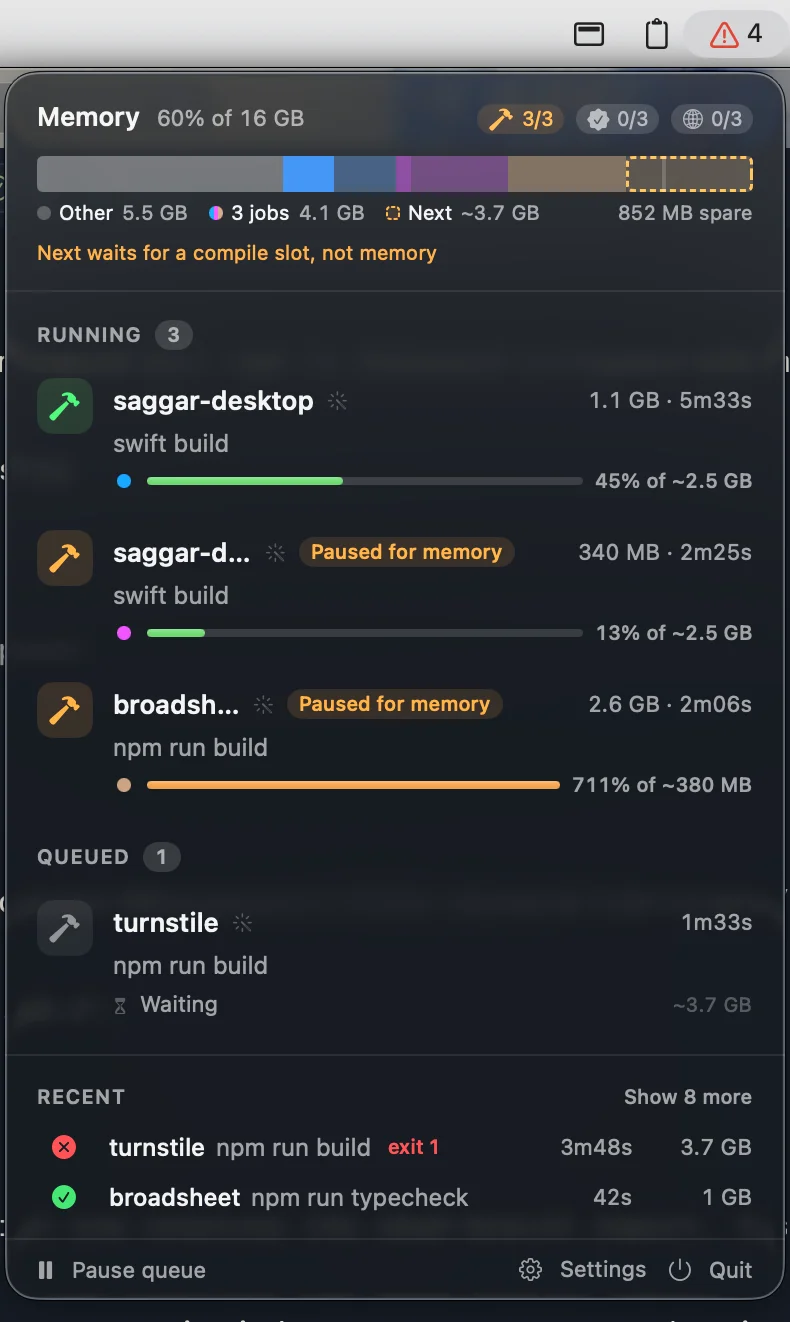
turnstile works in the background, so there's also a menu bar app for when no terminal is open on it. The icon shows how many jobs are running or queued, and turns into a warning when memory is low or a job has been paused for it. Each job in the menu has bump, pause or hold, and kill, and right-clicking one opens its folder or, for a run with no terminal, its log. Pause queue, at the bottom of the menu, starts nothing new until you resume it, while running jobs carry on.
A job that has run far longer than it should is tagged "Stuck?" and turns the icon orange: three times its usual run time and at least 10 minutes over, or past 2 hours unless it usually takes longer. Paused time doesn't count. It matters beyond that job, because a running job keeps its unused memory estimate committed, so the queue can sit waiting behind something that's hung. Hover the tag to see how long it's run, its usual time, and how much memory it's holding back.
You get a notification when a job is paused for memory, one is killed as a runaway, your job starts after a long wait, a job may be stuck (with a Kill button), or your run fails. A notification when the queue clears is also available, off by default.
brew install mcclowes/turnstile/turnstile mcclowes/turnstile/turnstile-app
The cask depends on the turnstile formula rather than bundling its own CLI, so uninstalling the app leaves the CLI in place. To build it from source instead:
./scripts/package.sh --dev && open .build/Turnstile.app
It only watches the daemon, polling every 2 seconds, and never starts it or keeps it alive. When the daemon is idle the menu says so, and picks it up again when it starts. The icon stays the same while the daemon sleeps.
Every few minutes it also checks the install, without a shell or the daemon, and turns the icon red when nothing is gated: the CLI isn't set up (the app installed on its own, or turnstile init never run), the shims are missing, or turnstile disable is on. It turns orange when no command has gone through the shims yet, the global config is invalid, or the daemon and the app are from different releases. The menu names the problem and the command that fixes it; click the command to copy it. It can't see your shell's PATH, so turnstile doctor in a terminal remains the full check.
Settings has three tabs. General holds the gating switch, the notification switches, and "Launch at login". Limits edits the global config's slots per class, memory reserve, pausing, runaway multiplier, hard memory cap, and parallelism injection, and writes only the keys you change; click the slot chips beside the memory meter to open it. Tools turns built-in shims off and adds your own, which is shims.add and shims.remove, and rebuilds the shims for you. While gating is off, the menu says so at the top with a button to turn it back on.
Hover a recent run's icon to see how it ended. If it left a log, click the icon to open it.
Limits offers three pause policies: compiles only (the default), all agent jobs, or never. Test and browser timeouts keep counting while paused, and your own jobs are never paused under memory pressure.
Open it once and turn on "Launch at login" in Settings.